Monthly reports and the weekly email
A PDF report for each client on the 2nd of every month, and a short email every Monday. Both in your agency’s name.
The monthly report
On the 2nd of every month (from 13:00 UTC) the app builds last month’s report for every client with connected accounts: a PDF of a few pages, in your agency’s name and logo, with a short summary email. Find it under Insights → Reports.
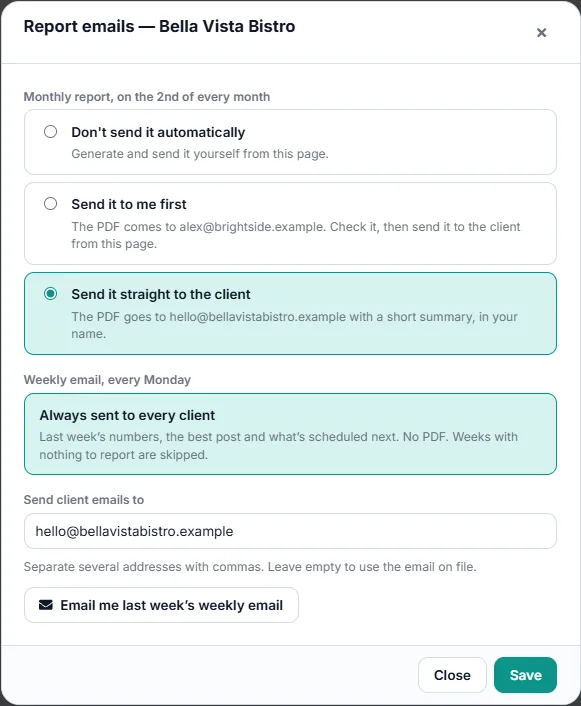
Choose who gets it for each client under Emails:
- Send it to me first: the PDF comes to you. Check it, then send it to the client from the Reports page.
- Send it straight to the client: it goes to the client’s email on file, or the addresses you enter (separate several with commas).
- Don’t send it automatically: generate and send it yourself.
What’s in it
- A summary of the month in plain words, and the month in numbers against last month.
- The Google profile: views, calls, direction requests and website clicks.
- Social media: people reached, followers, and each network; posts, posting days and the best posts.
- The website (Google Analytics), how the site does on Google (Search Console) and Google Ads, when connected.
- Comments, messages and reviews: how many came in, how many were answered, the reply rate and the time to the first answer (in opening hours), the same as the Inbox report.
- Next month’s plan and your recommendations, then every post of the month.
Posts the client made straight on the networks count too: they’re brought in before the report is built. Accounts left out of reports (the eye icon on the Clients page) never count.
Make it yours
- Customize adds your own summary, notes and next-month plan. Draft with AI writes them from the month’s figures for you to edit.
- Your logo and colour on the report come from Settings → Workspace.
- Generate a report for any month, Download PDF, or Email it from the Reports page. Past reports keeps every one.
The weekly email
Every Monday each client with connected accounts gets a short email: last week’s numbers, the best post and what’s scheduled next. No PDF, and weeks with nothing to report are skipped. It goes to the same addresses as the monthly report.
See what the client gets
Under Emails, Email me last week’s weekly email and Email me this report’s email send them to you, exactly as the client would get them.