Connect a client’s accounts, or ask the client to
Connect accounts yourself on the Clients page, or send the client a link so they sign in themselves.
Connect them yourself
When you can sign in to the client’s accounts (you’re an admin of their Facebook Page, a manager of their Google listing…):
- Open Clients and find the client.
- Under Connected accounts, click the network.
- Sign in on the network and approve access, then pick the client’s Page, profile or location.
Connect Google in one go
On the client’s page, Accounts and access has Connect Google (the connect panel has it too). One Google sign-in connects the client’s Business Profile, Google Analytics and Search Console. Google Ads stays its own button.
- The Business Profile location is the one with the client’s Google place (from the business details), else the one with the client’s name and address, else the only one in the Google account.
- The Analytics property is the one whose web stream is the client’s website. The Search Console property is the one that covers the website, the domain property first.
- Nothing is guessed. When the Google account has several and none matches, the panel lists them to pick from. Anything unticked on Google’s screen shows Not given.
- A connection that already works is left as it is. To switch one, use its own Change button.
- When the client’s website isn’t in Search Console for that Google account, the panel says so, and Owners get one notice per client: add the site in Search Console, then connect it.
Ask the client to connect
Usually easier: the client signs in with their own accounts and nobody shares a password.
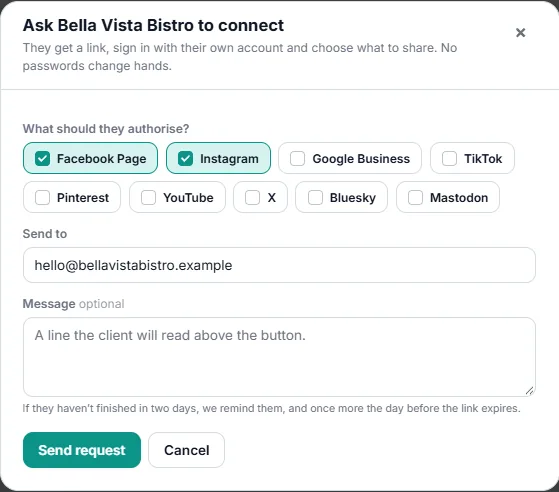
- On the client’s card, click Ask the client to connect (owners only).
- Tick the networks you need and send. The client gets an email with a link in your agency’s name.
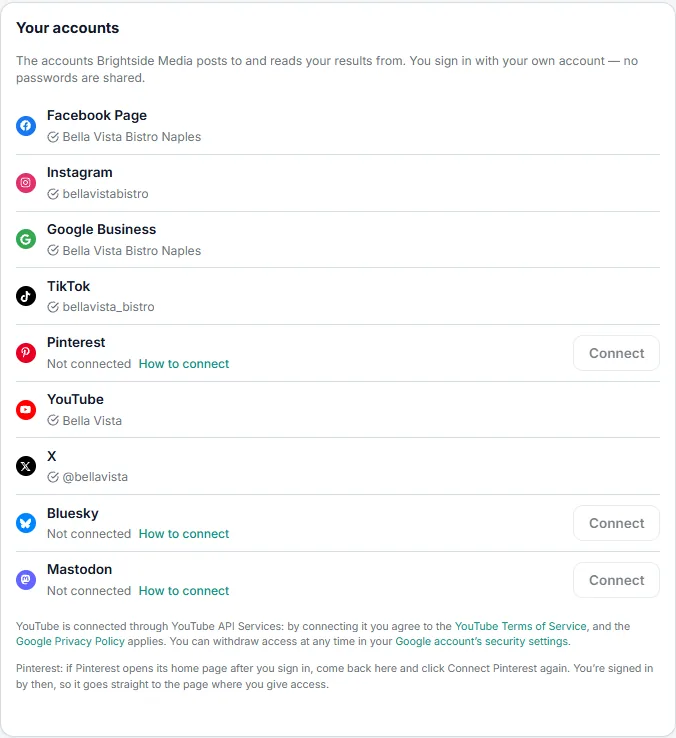
- The client opens the link and connects each account — see what the client sees. Business Profile, Analytics and Search Console are one Google row there, with one Google sign-in (Connect Google).
- Reminders go out on their own after two days and the day before the link expires (about a week). A link sent with the client’s invitation has no reminders of its own: the invitation’s reminders cover it, about the step that is left.
- Clients with a portal login can connect and reconnect accounts themselves from their account page.
When a connection breaks
Networks sometimes end access — a changed password, a removed admin, an expired sign-in. The account shows Reconnect needed, and you get an alert. Reconnect it yourself, or use Send the client a reconnect link.
Test accounts on a real client
Click the eye icon on a social account to leave it out of reports. It shows Not in reports, nothing it posts counts in the monthly report or weekly email, and the client’s own login doesn’t see it.
Disconnect an account
Owners and Editors can disconnect any of a client’s accounts from its card on the Clients page. The same rule applies to every network, and the window says what will happen before you confirm:
- The app forgets the account’s sign-in and stops posting to it and reading its new figures.
- Access is also ended at the network where that can’t affect other accounts: TikTok, Mastodon and YouTube are told to end it, the Telegram bot leaves the channel, and LinkedIn and X are told only when that sign-in isn’t used by another connected account.
- A Facebook Page stops sending new comments and messages to the inbox. The permissions of the Facebook login itself are never removed, because that would cut off other Pages connected with it.
- Scheduled posts and posts waiting for approval lose only this account. A post left with no network becomes a draft on the same day, with a note saying why.
- Published posts, figures and history stay.