Your agency sent you a link to connect your accounts
What the link does, and what happens when you click Connect.
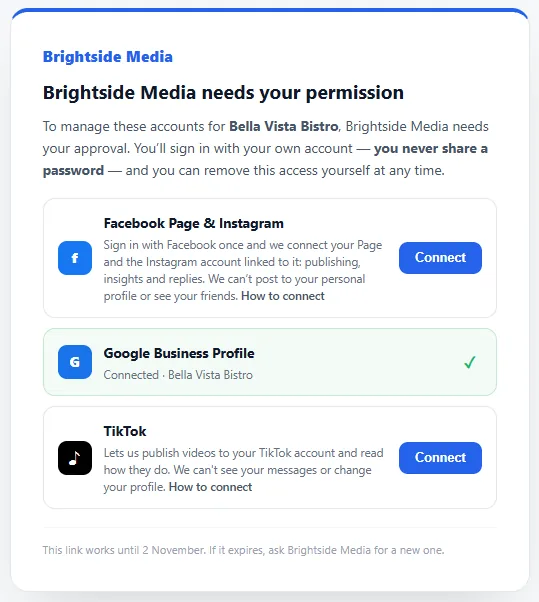
Your agency asked for permission to manage some of your social accounts or your Google accounts. The link opens a page that lists them, each with its own Connect button.
How it works
- Open the link. It shows your agency’s name and the accounts it asked for.
- Click Connect next to an account. You go to that network’s own sign-in page (Facebook, Google, TikTok…).
- Sign in there with your own account and approve the access. Nobody else sees your password.
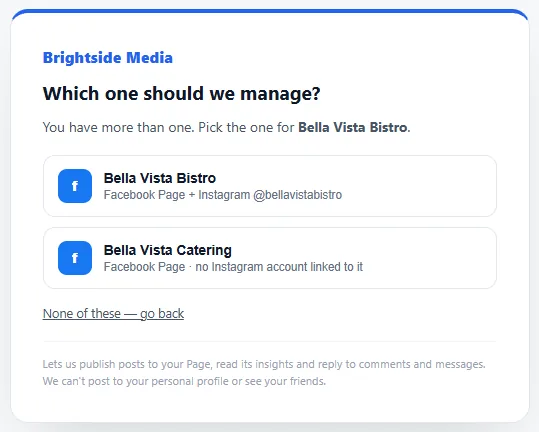
- You come back to the link. If you manage more than one Page, profile or location, pick the one for your business.
- The row turns green with a tick. When every row is done, the page says You’re all set.
Good to know
- Facebook and Instagram are often one row, Facebook Page & Instagram: one Facebook sign-in connects your Page and the Instagram account linked to it.
- Google is one row, Google (Business Profile, Analytics, Search Console): one Google sign-in connects your business on Google, your website’s Analytics and Search Console, and picks the ones that match your business and website. See Connect Google.
- A row that says Later can’t be connected yet. There’s nothing to do; your agency will let you know.
- The link works for about a week and shows the date it stops working. If it has expired, ask your agency for a new one.
- You don’t need to do everything at once. Come back to the same link to finish the rest.
- You can remove the access at any time in the network’s own settings. Each guide below says where.